Meet Zoe & team
AI specialists for your marketing
Each one has one job, from finding trends to writing your report. Tell Zoe what you need, and Zoe puts the right specialists on it and checks their work before you see it. Nothing goes public until you say yes.
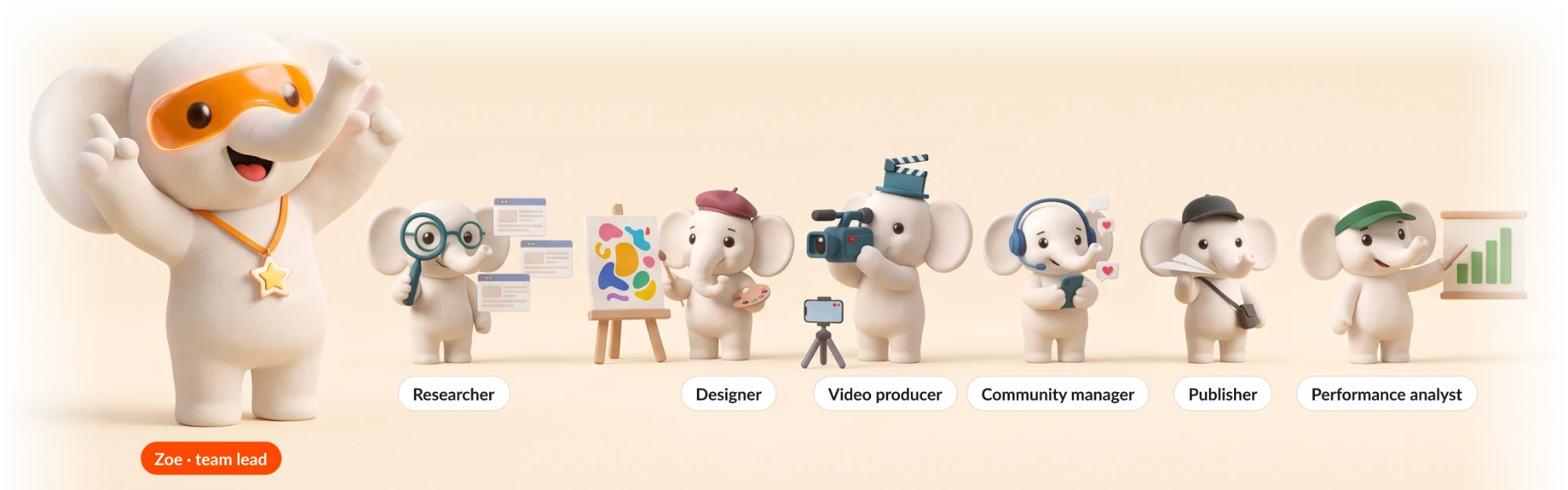
Zoe leads. A specialist for every job
Each specialist has one job and only the tools that job needs. You ask Zoe, and Zoe decides who works on it. Open a specialist to see their work.

Zoe
Team leadDecides which specialist to ask next and pulls their work together. Zoe leads every team you start from chat.
Know
Knows your business and your market

Brand guardian
Keeps everything true to your brand

Researcher
Finds trends and facts

Competitor analyst
Watches your competitors

Strategist
Plans what to post and when
Make
Makes the work

Creative director
Comes up with big ideas and reel scripts

Copywriter
Writes captions in your voice

Designer
Makes the pictures

Video producer
Makes the reels and videos

Media curator
Finds the photos, clips and music
Grow
Brings the customers in

Ads head
Plans your ads, asks before any change

Publisher
Posts only after you say yes

Community manager
Answers comments and messages

Leads manager
Finds your leads, drafts each follow-up

Influencer scout
Finds creators worth working with

Local SEO specialist
Gets you found on Google
Run
Measures, checks and keeps it running

Analyst
Reads your numbers, writes your reports

Quality lead
Checks facts, brand and quality

Automation builder
Builds agents that do the repeat work

Chief of staff
Prepares meeting briefs and action items
One ask. The right specialists on it
Zoe plans the job, hands each part to the right specialist and checks what comes back. You see the finished work, and you decide what goes out.
- ResearcherDone
- Found what saree buyers are talking about this week
- StrategistDone
- Planned 3 posts for the week, and when each goes out
- DesignerDone
- Made the posts in your brand colours
- CopywriterDone
- Wrote the captions in your voice
- Quality leadDone
- Checked prices, spelling and brand

Fri 6 Nov, 7:00 PM
Instagram and Facebook
Kanjivaram silk, handwoven for Diwali. ₹4,999 a saree.

Sat 7 Nov, 6:30 PM
Instagram carousel
Five sarees for your Diwali puja. Swipe to see them all.

Sun 8 Nov, 8:00 AM
Instagram, Facebook and Google
Happy Diwali from all of us at Kalamkari Threads.
Run a campaign
Put your team on my Diwali campaign: research, a plan, posts and captions, ready for my approval
Zoe’s team at work
- Researcher: Found what saree buyers are talking about this week
- Strategist: Planned 3 posts for the week, and when each goes out
- Designer: Made the posts in your brand colours
- Copywriter: Wrote the captions in your voice
- Quality lead: Checked prices, spelling and brand
Fri 6 Nov, 7:00 PM
Instagram and Facebook
Kanjivaram silk, handwoven for Diwali. ₹4,999 a saree.
Sat 7 Nov, 6:30 PM
Instagram carousel
Five sarees for your Diwali puja. Swipe to see them all.
Sun 8 Nov, 8:00 AM
Instagram, Facebook and Google
Happy Diwali from all of us at Kalamkari Threads.
Approve and schedule
An agent on a schedule
Watch Tandoor Theory every Friday evening
Zoe’s team at work
- Competitor analyst: Their posts, ads and reviews
- Zoe: Every Friday at 6:00 PM
- Competitor analyst: Tells you what changed since last week
- Last FridayStarted a new ad for party plattersOpen
- 2 weeks agoPosted 3 Reels, one about a Diwali set menuOpen
Add another competitor
Morning brief
Send me a brief every morning at 7
What Zoe’s team did
- Zoe: Yesterday’s numbers, and any post far above or below usual
- Zoe: Comments and Google reviews waiting for an answer
- Zoe: What your competitors started
- Zoe: Festivals in the next 14 days and gaps in your plan
Zoe's morning brief
Today, 7:00 am
3 things that matter today
Your Sunday reel reached 3 times more people than usual.
4 comments and 1 Google review are waiting for an answer.
Bhai Dooj is 5 days away and nothing is planned for it yet.
Nothing is posted or sent without your yes.
Weekdays only
A WhatsApp agent
Make a WhatsApp agent for my clinic that answers questions and books appointments
What Zoe’s team did
- Zoe: Building your WhatsApp agent
- Zoe: Tried it as a customer before you see it
- ZoeDone
- Conversation designerDone
- CopywriterDone
- Integration builderDone
- WhatsApp rules checkerDone
- TesterDone
- 1Answers from the clinic’s facts
- 2Checks if the clinic is open
- 3Asks for the patient’s name
- 4Asks for a day
- 5Confirms the booking
- 6Tells you about the booking
Try it as a customer
Agents do the repeat work on their own
An agent is when it runs, plus steps. Tell it once, in your own words, and your team does the job on the schedule you choose or when something happens.
Post on festival days
Zoe knows the festivals for your city and business, so you never type a date. On a festival eve Zoe makes the greeting. You approve it that evening, and it posts at 8 am on the day.
- When it runsEvery eveningStarting…
- ResearcherFestivals tomorrowUp next
- Designer and CopywriterDesign and captionUp next
- YouYou approveUp next
- PublisherPosts at 8 amUp next
- When it runsEvery eveningStarting…
- ResearcherFestivals tomorrowUp next
- Designer and CopywriterDesign and captionUp next
- YouYou approveUp next
- PublisherPosts at 8 amUp next
- Leaves your offer out on days that should not carry one, and tells you
- Try it weeks early with Pretend today is
Post on festival days
When it runs: Every evening
Zoe knows the festivals for your city and business, so you never type a date. On a festival eve Zoe makes the greeting. You approve it that evening, and it posts at 8 am on the day.
- Researcher: Festivals tomorrow
- Designer and Copywriter: Design and caption
- You: You approve
- Publisher: Posts at 8 am
- Leaves your offer out on days that should not carry one, and tells you
- Try it weeks early with Pretend today is
Reply to reviews in my voice
When it runs: When a Google review comes in
Zoe writes a reply in your brand voice and asks you before anything is posted. Reviews of 2 stars or fewer are left for you, and Zoe tells you about them.
- Community manager: Write the reply in my voice
- You: You approve
- Publisher: Reply posted
- Asks you before each reply
- Tells you about reviews of 2 stars or fewer
What people say on YouTube and Threads
When it runs: Every Monday
Zoe searches YouTube and Threads at the same time with the words people use for your business, plans a week of posts that answer it, and tells you when the plan is ready.
- Researcher: Search YouTube
- Researcher: Search Threads
- Strategist: Plan the content
- Zoe: Tell me
- Reads only, nothing is posted
- Long lists are shared fairly between the two
Monthly competitor report
When it runs: On the 1st of every month
Zoe studies the competitors in your brand kit, writes a PDF report with what to try next, and sends you a notification with the link.
- Competitor analyst: Study competitors
- Creative director: Turn what they do into ideas
- Reporter: Write a report
- Zoe: Send me a notification
- Reads only, nothing is posted
- Uses the competitors in your brand kit
My best post, rewritten for LinkedIn
When it runs: Every Friday
Zoe finds your best post of the week, rewrites it for LinkedIn in a professional voice and posts it at the best time after you approve.
- Analyst: Find my best post
- Copywriter: Write the caption
- You: You approve
- Publisher: Post to LinkedIn
- Asks you before it posts
- The preview shows how it looks on LinkedIn
A stock photo carousel on a topic
When it runs: When you press Run
Zoe finds free photos for a topic, makes a carousel in your brand colours and asks you before posting it on Instagram.
- Designer: Find free photos
- Designer: Make a carousel
- Copywriter: Write the caption
- You: You approve
- Uses free photos with their credit lines
- Asks you before it posts
- Three ways to startOn a schedule, like every Monday at 10 am. When something happens, like a new review. Or only when you press Run.
- Describe it, Zoe drafts the stepsSay the job in one sentence. Each step does one thing on one platform, so you always know what it will do.
- Your brand kit fills it inYour accounts, colours, logo, hashtags, voice and offer fill each step. Change the kit once and every agent uses it on its next run.
- Test it before it goes liveTest runs everything and posts nothing. See what each step made, and use Pretend today is to try a festival post weeks ahead.
- You approve what goes publicPosts and ad spend ask you first, on a card with the post: Approve or Change.
- Zoe notices what you repeatAsk for the same thing twice, like a competitor watch, and Zoe offers to do it for you every week.
Start from a recipe
Ready jobs, filled in from your brand kit. Two clicks and no typing. Open one to see when it runs, what it makes and what you control.
Weekly content plan
Once a week, Zoe looks at trends, competitors and your best and worst posts, then brings you post ideas to approve.
Festival and occasion posts
Five days before a festival that matters to you, Zoe makes the posts and schedules them once you approve.
Posting gap nudge
If you have not posted for 3 days, Zoe sends 3 quick ideas.
Repurpose a top post
Every Wednesday, Zoe turns your best recent post into a fresh carousel or reel.
Weekly posts, made and scheduled
Every Sunday, Zoe plans next week, makes the posts with captions, and schedules them once you approve.
Zoe’s morning brief
Every day at 7 am, Zoe tells you the 3 things that matter today, with up to 3 drafts ready for your yes.
Competitor watch
Every Thursday, see what your competitors posted and what is working for them.
Best and worst posts review
Every Friday, learn from your best and weakest posts of the week.
Trend alert
Each morning, if something big is trending in your field, Zoe tells you with 2 ideas.
Rescue a weak post
When a post does worse than usual, Zoe says why and what to change next time.
Comment keyword reply
When someone comments asking the price, Zoe drafts a reply and a private message for you to approve.
Comment to private message
When someone comments a keyword like LINK, Zoe sends them a private message with your link, after you approve.
New message helper
When a message asks about price, Zoe writes the reply for you to copy.
Review replies
When a Google review comes in, Zoe drafts a thank-you and tells you at once about low ratings.
Reply to every comment
When someone comments, Zoe writes a reply in your voice for you to approve.
Monthly report
On the 1st, a PDF report of last month: growth, best posts and link clicks.
Questions about Zoe's team
What is Zoe's team?
Zoe and a team of AI specialists inside ZocialOne, in four groups: Know, Make, Grow and Run. Each specialist has one job, from finding trends to running your ads or writing your report, and only the tools that job needs. Zoe decides who works on each job and checks the work before you see it.
Do I have to choose the specialist?
No. Ask Zoe in your own words and Zoe puts the right specialists on it. You can also start from any specialist’s example asks.
What is an agent?
A job your team does on its own. An agent is when it runs, plus steps: on a schedule, when something happens such as a new comment or review, or only when you press Run. Start from a recipe, or describe the job and Zoe drafts the steps.
Does anything get posted without my approval?
No. Posts and ad spend ask you first: you get a card with the post and choose Approve or Change. Test runs a whole agent without posting anything. Comment automations and WhatsApp agents reply on their own only after you turn them on.
Can I give a specialist my own rules?
Yes. Duplicate a specialist and give the copy your own rules and tone, like a Copywriter who never mentions delivery. The original never changes.
How many credits does an agent use?
Each recipe shows how many credits a run takes before you turn it on, and every run shows the credits it used. The morning brief usually takes about 3 credits a morning and never goes over the daily limit you set. Every plan comes with Zoe credits: 600, 1,500 or 4,500 a month.
Which platforms does the team work with?
The team posts to Instagram, Facebook, LinkedIn, YouTube, Pinterest, Threads, Google Business Profile and X, runs your Meta, Google, LinkedIn, X and ChatGPT ads, and answers customers on WhatsApp. Comment and review replies cover Instagram, Facebook, LinkedIn and Google Business Profile.
Can an agent answer my customers on WhatsApp?
Yes. Describe the agent to Zoe, like a front desk that answers questions and books appointments, try it as a customer, then approve it once to turn it on. It hands the chat to you when a customer asks for a person.
What happened to Scheduled Tasks?
Scheduled tasks are now agents: tell Zoe once and your team does the job on a schedule or when something happens. Tasks you already set up keep running.
Your team is ready
Tell Zoe what you need and the right specialists get to work. Try it free for 7 days.